Decision stage
RdyRack: A Native macOS Grid for Parallel AI Work
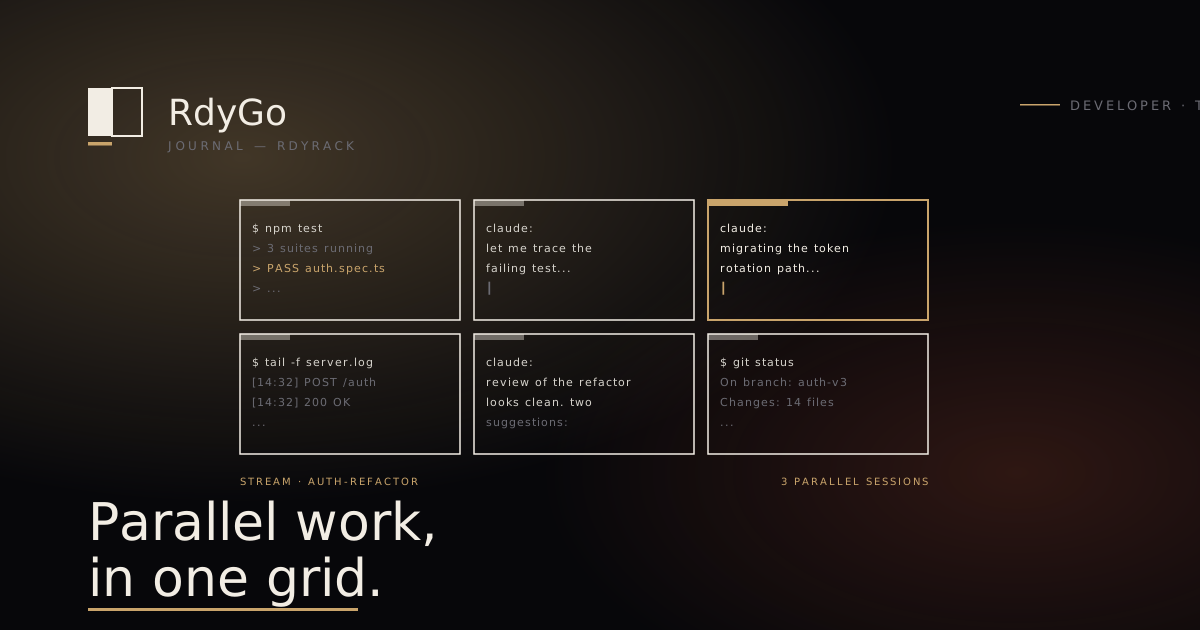
The way senior engineers work changed in late 2024 and most editors have not caught up. A single engineer who was running one shell and one editor in 2023 is now running three to six shells, two to four AI panels, and juggling that across parallel branches of a refactor. The editor sits at the centre of the day, and the shape of the editor starts to matter more than almost any other tool choice.
Electron editors were not designed for this. They treat the terminal as an afterthought, the AI as a sidebar, and the window as a single-focus object. When the work is six shells and four Claude sessions, a single-focus sidebar is the wrong primitive.
RdyRack is built for the opposite pattern. It assumes the grid is the default, the AI is a pane like any other, and the engineer is running parallel streams of work rather than linear ones.
The primitives
Seven design decisions define the tool.
-
Grid-first layout. The default is a 2×2 grid of panes, not a single full-screen editor. Add panes, split, swap. Every pane is equal — a shell, an AI panel, a log tail, a file preview — they all live in the same grid taxonomy.
-
AI panels as first-class panes. A Claude pane is not a sidebar extension; it is a pane. It shares keybindings, navigation, and lifecycle with shell panes. Spawn a new Claude session with the same shortcut that spawns a new shell.
-
Stream tags. Every pane is tagged with the stream it belongs to — “auth-refactor”, “flaky-test-investigation”, “vendor-migration”, “perf-regression”. Panes can be filtered by stream, restored by stream, broadcast to by stream.
-
Broadcast input. Selected panes receive the same keystroke stream. Type once, four agents act in parallel. The primitive is that simple; the consequences are not.
-
Right-click a stack trace into a new Claude session. The specific detail that engineers remember. A stack trace in a shell pane becomes a fresh Claude session in a new pane, pre-populated with the trace and the file context, with a keystroke. The ergonomic gap this closes — from “copy the trace, switch window, paste, add context” to “right-click” — is maybe four seconds. Across a day, it is a different workflow.
-
Terminal-first rich previews. Anything clickable in the terminal — file paths, URLs, image paths, test report summaries — renders as a rich preview in a sidecar pane. You get the preview without losing terminal focus.
-
Dark, native, signed. GPU-backed text rendering on macOS. Proper sleep and wake. Instant startup. Signed and notarised so Gatekeeper doesn’t greet you suspiciously on every new installation. The boring parts are not decorations; they are what makes the tool feel like a part of the OS rather than a web app in a frame.
A day in the grid
Here is what a typical morning looks like for an engineer running parallel streams.
09:00. Open RdyRack. Restore yesterday’s stream layout: three panes on “auth-refactor”, two on “vendor-migration”, one on “flaky-test-investigation”. Each pane comes back at the directory it closed in, with its history intact.
09:05. Kick off the test suite in the auth-refactor shell. While it runs, pop a Claude pane with the RFC draft for the refactor’s interface changes and have it critique the draft.
09:07. First test failure lands. Right-click the stack trace into a new Claude session. Ask it to identify whether the failure is related to the in-flight refactor or a pre-existing flake.
09:20. The vendor-migration stream has three shells running data exports across three different partner systems. Broadcast grep -c ERROR to all three to check for rate-limit issues. All three respond; one has hit a ceiling. Drill into that shell directly.
10:00. Switch to the flaky-test-investigation stream. Two panes: one running the flaky suite in a loop, the other tracking which tests fail in which runs. The tracking pane is a Claude session pointed at the loop output.
11:30. Back to auth-refactor. All three panes in that stream are Claude sessions working on different parts of the migration. Broadcast “summarise the changes you’ve made so far and list any edge cases you deferred” to all three at once. Read the three summaries side by side.
The shape of this morning is parallel streams of work coordinated through a grid. It is not the shape that IDEs optimise for, and it is not the shape that terminal multiplexers without AI-aware primitives optimise for either.
What RdyRack won’t do
The list of features RdyRack does not have is as important as the list of features it does.
- No file tree. Use your IDE for file navigation.
- No language server. Syntax highlighting is limited to shell output and basic file previews.
- No debugger UI. Debugging lives in your IDE or your CLI debugger.
- No extension marketplace. Extensions are a long tail of quality; an opinionated tool says no.
- No mobile companion. The tool is a desktop workspace. That is the scope.
- No cloud sync. Stream layouts are local to the machine. Sync your layouts via your dotfiles like everything else.
Each of these is a decision about scope, not about capability. A tool that does everything teaches nothing, and the editor-space is littered with products that tried to be IDE-plus-terminal-plus-notebook-plus-chat and shipped none of them well.
When RdyRack is the right choice
Three conditions that, together, describe the target user:
- You are running three or more concurrent AI coding sessions regularly. If you are using AI for one session at a time, a sidebar in your IDE is sufficient.
- Your work shape is terminal-heavy. If most of your time is inside an IDE’s file editor, the grid does not pay for itself.
- You are on macOS. Sorry. Cross-platform is not the 2026 scope.
If those three apply, RdyRack is likely the tool you currently wish existed. If any of them does not, there are better choices for your shape of work.
When to look elsewhere
- If you want an AI-native IDE with in-line pairing on individual files, Cursor is the stronger fit.
- If you want the fastest native editor that happens to have AI features, Zed is the stronger fit.
- If you want a terminal multiplexer without AI-pane primitives and are on Linux, Zellij or tmux with a careful config will serve you well.
RdyRack is for the specific workflow shape where you are the orchestrator of multiple parallel streams, not where you are pair-programming with a single model.
RdyRack is in the workshop — macOS first, signed and notarised, and the waitlist is open.
Related reading:
- Shipping Software You Can Bet a Career On — the portfolio thesis.
Frequently asked
What is RdyRack?
RdyRack is a native macOS editor for engineers running multiple concurrent AI coding sessions. It combines grid-layout terminals, dedicated AI panels (Claude, ChatGPT, or the model of your choice), broadcast-input across panes, and stream-tagging primitives into a single workspace. It is signed and notarised for macOS, dark-first, and deliberately opinionated about workflow shape.
How is RdyRack different from Cursor or Zed?
Cursor is an IDE built around in-context AI pairing. Zed is a fast native editor with AI features. RdyRack is neither — it is a terminal-and-AI multiplexer for engineers who are running multiple parallel streams of work, not writing one file at a time. The three tools solve different shapes of the AI-coding problem; many engineers end up using more than one.
Does RdyRack replace my IDE?
No. RdyRack is not an IDE — no file tree, no language-server integration, no debugger UI. It sits beside your IDE. The pattern most engineers settle on is the IDE for file editing and the RdyRack grid for terminal sessions, AI panels, and the cross-session orchestration that neither IDE nor terminal multiplexer does well on its own.
What is 'broadcast input' and why does it matter?
Broadcast input sends a single keystroke or prompt to all selected panes simultaneously. When you have three Claude sessions each working on a different part of the same refactor, you can broadcast 'run the test suite and report the first failure' to all three at once, and they all receive it in parallel. It is the single most useful primitive for parallel work streams, and it is what changes the ergonomic shape of running four agents at once.
Why macOS only?
Native macOS gives us AppKit window management, proper sleep/wake behaviour, Retina rendering, colour management, and GPU-backed text that Electron editors cannot match. Cross-platform is on the roadmap, but the native-macOS constraint forced the design decisions that make RdyRack what it is. A cross-platform build would be a different product.
Is RdyRack opinionated?
Yes, by design. It has no file tree. It has no extension marketplace. It does not try to be your IDE. It does one thing — run parallel terminal and AI sessions in a grid with broadcast and stream primitives — and refuses to be dragged into other things. A tool that does everything teaches nothing.
Referenced products
Related entries